Top 5 Tipps für ShotKam-Aufnahmen bei der Wasserwildjagd
Die Wasserwildjagd ist schnelllebig und spannend. Vögel können sich ohne Vorwarnung nähern, Schüsse fallen rasch, und nicht immer bleibt Zeit für Anpassungen. Mit der ShotKam-Kamera können Sie wichtige Momente im Revier festhalten und speichern.
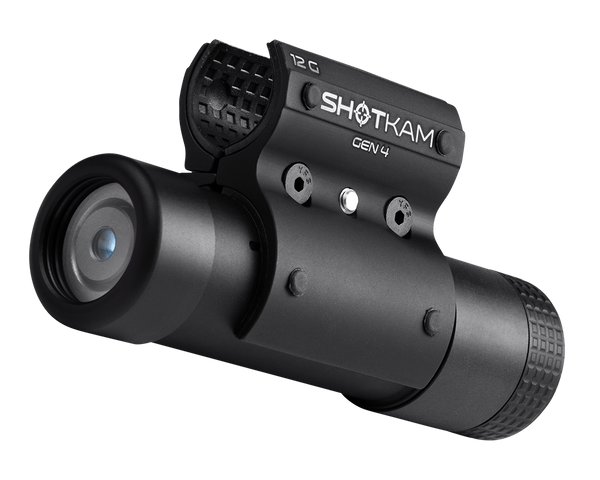
Die Gen 4 wurde speziell für die Vogeljagd entwickelt und ist dafür gebaut, allen Bedingungen standzuhalten, während sie Videos in hoher Qualität aufzeichnet. In diesem Leitfaden stellen wir fünf praktische Tipps vor, mit denen Sie Ihre ShotKam richtig einrichten, die passenden Einstellungen wählen und Ihre besten Schüsse bei der Wasserwildjagd erneut erleben können.
Sehen Sie sich das Video unten an, um echte Wasserwildjagden zu sehen, die mit der ShotKam Gen 4 aufgenommen wurden.
1. Halten Sie den Lauf aus dem Bild
Die ShotKam Gen 4 wird direkt am Lauf montiert und sitzt stets darunter. Um zu reduzieren oder zu verhindern, dass der Lauf in Ihren Videos erscheint, können Sie einstellen, wie nah die ShotKam an der Mündung positioniert ist:
-
2,7K-Videoformat (Standardformat für Flying Birds): Positionieren Sie die Frontlinse innerhalb von 8 Zoll (20 cm) von der Mündung
-
4K-Videoformat: Innerhalb von 5 Zoll (13 cm) von der Mündung
Wenn die Kamera näher an der Mündung sitzt, gelangt der Lauf nicht ins Bild, sodass Sie einen freien Blick auf den Vogel behalten.

Profi-Tipp: Stellen Sie immer sicher, dass die ShotKam mindestens 3 Zoll (7 cm) von der Mündung entfernt montiert ist, um die Linse vor Schmutz und Partikeln zu schützen.
2. Überprüfen Sie die richtigen Einstellungen in der ShotKam-App
Für die Wasserwildjagd ist der Zieltyp Flying Birds entscheidend. Diese Einstellung ist auf Vögel optimiert und bietet Ihnen den besten Zoom, das optimale Sichtfeld und die passende Videolänge.
Vor der Jagd:
-
Schalten Sie Ihre ShotKam Gen 4 ein und verbinden Sie sich mit dem ShotKam-WLAN-Netzwerk.
-
Öffnen Sie die ShotKam-App und gehen Sie zu Shooting Settings.
-
Wählen Sie Target Type: Flying Birds.
-
Wählen Sie das richtige Shooting Device für Ihre Flinte (Bockdoppelflinte, Halbautomat oder Vorderschaftrepetierer).
-
Wenn Sie ein anderes Absehen bevorzugen, tippen Sie auf Reticle und wählen Sie eine andere Option, z. B. den Red Dot.

Profi-Tipp: Im Modus Flying Birds zeichnet Ihre ShotKam 3 Sekunden vor dem Schuss und 3 Sekunden nach dem Schuss auf und spielt das Video anschließend mit einem Drittel der Geschwindigkeit ab. So erhalten Sie einen vollständigen Überblick über den Vogel, den Schuss und den Treffer.
3. Stoßen Sie leicht an die Waffe, wenn sich Vögel nähern
Wenn sich die ShotKam im Normal Shooting Mode befindet, wechselt sie nach 30 Sekunden ohne Schuss in den Sleep Mode, um Batterie zu sparen. Sobald Sie Vögel sehen, ist es wichtig, folgende Schritte zu beachten:
-
Stoßen Sie leicht mit der Hand gegen Schaft oder Vorderschaft, um die Kamera zu aktivieren, oder drücken Sie einmal die Steuertaste, um sie manuell zu wecken.
-
Achten Sie auf ein durchgehend grünes LED-Licht – dies bedeutet, dass die Kamera aktiv und bereit ist, Videos zu speichern.
-
Geben Sie den Schuss ab, wenn Sie bereit sind.
Wenn die Kamera schläft und Sie schießen, ohne sie zu aktivieren, wird Ihr Schuss möglicherweise nicht aufgezeichnet.

Profi-Tipp: Jeder Stoß setzt den 30-Sekunden-Timer zurück. Es ist daher eine gute Gewohnheit, die Waffe leicht anzustoßen, wenn Sie sich nähernde Vögel sehen. Nach einigen Schüssen wird dies ganz natürlich und instinktiv erfolgen.
4. Folgen Sie dem Vogel nach dem Schuss
Eine der einfachsten Möglichkeiten, Ihre Jagdaufnahmen zu verbessern, ist es, nach dem Schuss beim Vogel zu bleiben. Senken Sie die Waffe nicht sofort, sondern behalten Sie den Anschlag bei und verfolgen Sie den Vogel, sofern dies sicher möglich ist. So entsteht ein professionelles Video, das den Schuss vom Anfang bis zum Ende zeigt.

Die ShotKam speichert mehrere Schüsse innerhalb von 9 Sekunden als ein zusammenhängendes Video. Wenn Sie beim Vogel bleiben, erhalten Sie daher eine sauberere und zufriedenstellendere Wiedergabe.
5. Sehen Sie sich Ihre Videos direkt im Revier an
Das Ansehen Ihrer Aufnahmen während der Jagd ist nicht nur unterhaltsam, sondern hilft Ihnen auch, Anpassungen in Echtzeit vorzunehmen.
So überprüfen Sie Ihre Schüsse:
-
Verbinden Sie Ihr Smartphone oder Tablet mit dem WLAN der ShotKam.
-
Öffnen Sie die ShotKam-App und tippen Sie auf Watch Videos.
-
Wählen Sie einen Clip aus, um ihn in Zeitlupe abzuspielen oder Bild für Bild durchzugehen.
Die Überprüfung im Revier ermöglicht es Ihnen:
-
Zu überprüfen, ob Kamerawinkel und Laufposition korrekt sind
-
Montage- oder Timing-Gewohnheiten zu erkennen, die Ihnen sonst vielleicht entgehen
-
Schnelle Anpassungen vor dem nächsten Vogel vorzunehmen

Profi-Tipp: Ihre Videos werden im internen Speicher der ShotKam gespeichert, und Sie können Clips direkt auf Ihr Smartphone oder Tablet herunterladen und sichern: Anleitung zum Speichern von Videos.
Fazit
Die ShotKam Gen 4 ist dafür gebaut, allen Jagdbedingungen standzuhalten. Mit der richtigen Einrichtung und ein paar einfachen Gewohnheiten können Sie zuverlässig Aufnahmen erstellen, die jeden Schuss im Detail zeigen.
Egal, ob Sie Ihre eigenen Jagden auswerten oder Clips mit Freunden teilen – diese Tipps helfen Ihnen, das Beste aus jeder Wasserwildsaison herauszuholen.
Sie lesen: